
My Journey in Homelabbing
 A look at how I fell into homelabbing, what I’m running now, what I’ve broken, and how self-hosting helped me learn real-world IT skills.
I did not start homelabbing because I had some perfect plan or enterprise-grade design document. I started because I like messing with technology, breaking things, fixing them, and learning how systems actually work when you are the one responsible for keeping them alive.
My first real experience with homelabbing was finding out about Jellyfin back in 2019. At the time, I did not even fully understand what “self-hosting” meant. I just thought it was cool that you could run your own media server instead of relying on some outside service.
After that, I got my first Raspberry Pi for my 3D printers so I could set up OctoPrint. That was another one of those moments where I realized, “Wait, I can host this myself?” It started small, but it opened up a whole rabbit hole.
Then my uncle introduced me more seriously to the whole concept of homelabbing. At the time, I barely knew what that meant. I just knew I liked the idea of having my own systems to experiment with. After that, it kind of blew up exponentially.
At first, my homelab was mostly for personal projects and random things that made my life easier. I wanted my own media server, 3D printer controller, cloud storage, dashboards, and whatever else looked interesting that week. But once I started pursuing IT certifications and getting more serious about technology as a career, I started seeing the bigger value.
Studying for certifications is useful, but there is a big difference between reading about DNS, Linux, firewalls, backups, virtualization, or VPNs and actually having something break at 1 AM because you changed the wrong setting. Or dealing with a picky update that randomly decides today is the day it wants to ruin your plans.
That is where the homelab became more than just a hobby. It became my practice environment.
Over time, what started as a few experiments turned into a real space with physical servers, Raspberry Pis, VPS instances, Docker containers, TrueNAS storage, Proxmox virtualization, UniFi networking, DNS filtering, reverse proxies, VPNs, monitoring, and a bunch of services that are part practical, part “ok this is cool,” and part “I wonder if I can make this work.”
What My Homelab Looks Like Now (General Overview)
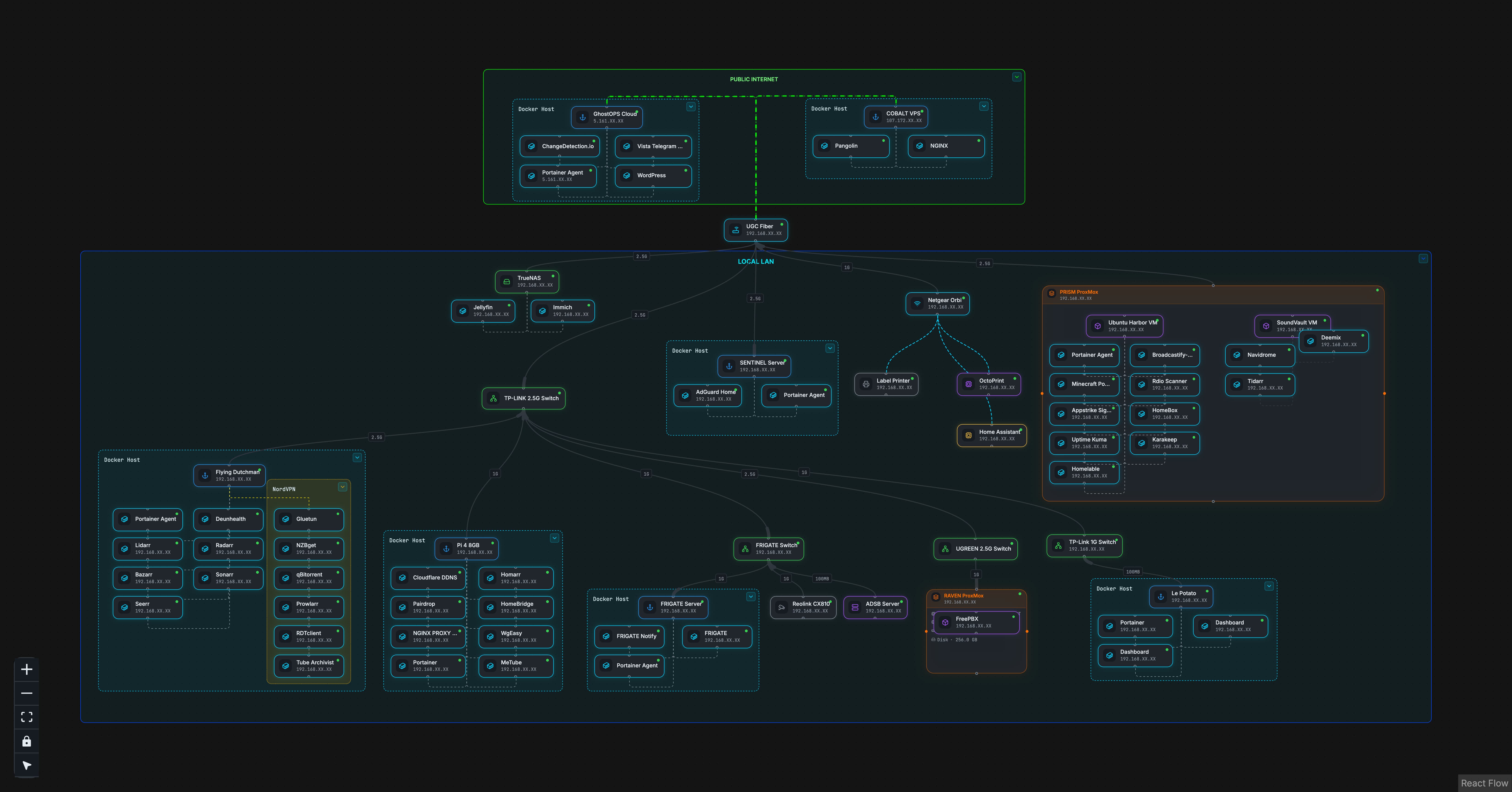 (Rough, not-fully-updated layout of what I’m running. I used homelable to generate this graph.)
Right now, my homelab is spread across around 15 hosts. Some are physical machines, some are Raspberry Pis, some are virtual machines, and some are VPS servers. Most of my services run in Docker, with Docker Compose and Portainer helping me keep things somewhat manageable.
I say “somewhat” because the lab is always changing. I will clean something up, then add three more things, then realize I need better documentation, then break something else. That is kind of the cycle.
The main pieces right now are:
- TrueNAS for storage and backups
- Proxmox for virtualization
- Raspberry Pis for smaller dedicated services
- VPS servers for public-facing projects
- UniFi for my home network
- Docker for most applications
- Reverse proxies and tunnels for service access
- DNS filtering and VPN access
- Monitoring and dashboards
- Security experiments and logging practice
That sounds organized when written out, but in real life it has been a lot of trial, error, and “why is this not resolving?”
TrueNAS and Storage
One of the main systems in the lab is my TrueNAS server. It is running a 12th Gen Intel Core i5-12400 with 16 GB of DDR5 memory. Storage-wise, I have five hard drives, with four drives used for the main RAIDZ1 pool and one used for backup. I also have two SSDs, one for apps and another that I may use for cache later after I max out the RAM.
From what I have read, with ZFS, RAM usually matters more than throwing cache at the problem too early. So that is one of those things I am trying to do the right way instead of just adding parts because they sound cool.
The main storage pool gives me around 31 TB usable. I use it for file storage, media, photo storage, and Time Machine backups for my Macs. Important data gets replicated to another drive, and eventually I want to build a second TrueNAS system at a family member’s house for offsite backups.
That is one of the biggest lessons storage has taught me: having a lot of space is not the same as having a PROPER backup plan (Cough cough.. raid is not backup ahem..).
Docker Is Where Most of the Lab Lives
A lot of my homelab runs on Docker. I have 40+ services spread across different systems. Some are practical, some are experiments, and some are just projects I thought looked cool.
I love docker! at first its a learning curve but its WORTH IT. Keeps everything in its own container and just soooo much more manageable than running bare metal.
I run things like Jellyfin, Immich, AdGuard Home, WireGuard, Nginx Proxy Manager, Traefik, Pangolin, CrowdSec, Uptime Kuma, FreePBX, Home Assistant, Homebridge, Frigate, ADS-B tracking with tar1090, OctoPrint, dashboards, and a bunch of smaller tools.
Docker has taught me a lot because containers are simple until they are not…
You have to think about ports, volumes, permissions, environment variables, container networking, DNS, reverse proxies, updates, and logs. When something breaks, the answer is usually somewhere in that mess. Sometimes it is obvious! Sometimes you stare at it for 45 minutes and then realize you spelled one environment variable wrong….
That pain is useful though. It teaches you how to slow down and troubleshoot instead of randomly changing things until it works.
AI has honestly been really helpful here too, not as a magic “fix it” button, but as a second set of eyes. If I paste in an error message, a Docker log, or explain what I already checked, it can usually point me toward the next thing to look at. Sometimes it catches something simple, like a bad path or a port conflict. Other times it just helps me think through the problem in a more organized way.
I still try not to blindly trust it, because AI can be confidently wrong. But for debugging, it has been useful for breaking down logs, explaining unfamiliar errors, suggesting commands to verify things, and helping me understand why something broke instead of just copying a fix and moving on.
Networking, DNS, and Remote Access
My network runs on UniFi gear. I am still learning how to use it better, and I want to eventually get deeper into VLANs and segmentation. I have not fully built that out yet because I want more UniFi gear first, but it is definitely in the plan!
DNS has been one of the biggest learning areas for me. I run AdGuard Home for DNS filtering, and once you start messing with DNS, you realize how much depends on it. If DNS is broken, everything feels broken. Just like Jeff Geerling says “It Was DNS…” and theres a reason for that saying lol.
For remote access, I have used WireGuard/wg-easy, Cloudflare DDNS, reverse proxies, and Pangolin/Newt tunnels. I have also worked with Nginx Proxy Manager and Traefik. That forced me to understand how traffic actually moves from a domain name to a service, and how SSL, ports, proxy hosts, and firewall rules all fit together.
Reverse proxies are one of those things that sound confusing at first, but once they click, they unlock a lot.
Security and Hardening
Security is one of the parts I want to keep improving. Because there’s no such thing as “fully secure” only more secure than before.
On my Linux servers and VPS systems, I use non-root users, SSH keys, firewall rules, automatic updates, and basic hardening where I can. I also have scripts that alert me when the server catches unique behavior.
CrowdSec is running on my Pangolin server right now, and I want to expand it to more systems later. I also run an OpenCanary honeypot on a Raspberry Pi, mostly as a way to learn about alerts and see what suspicious activity can look like.
One thing I learned the hard way is that Docker and UFW can be weird together. Docker can interact with firewall rules in ways that are not always obvious, so you cannot just assume UFW is blocking what you think it is blocking. That sent me down another rabbit hole of learning how Docker networking actually works.
My next big security goal is better logging and alerting. Logs are GOLD…. If something breaks or something weird happens, logs are what tell the story. Right now, I want to get better at centralizing logs instead of bouncing between machines trying to figure out what happened.
I also want to build an isolated pentesting practice lab. The idea is to run intentionally vulnerable Docker containers inside a VM, then use Kali or Parrot to practice in a safe environment. Nothing public, nothing sketchy, just a contained place to learn.
Proxmox, Clustering, and Future Plans
Proxmox Hypervisor is another area I want to keep expanding. I use it for VMs now, but I want to set up a Proxmox cluster soon. That should help me learn more about clustering, VM management, and how multiple hosts can work together.
I also want to dabble with Kubernetes. I am not going to pretend I know Kubernetes deeply yet (literally feels like magic), because I do not. But I want to understand the basics and see why people use it for container orchestration.
Some of my next goals are:
- build the Proxmox cluster
- learn Kubernetes basics
- clean up my Docker Compose files
- set up Gitea for versioning configs
- improve backups for service data
- centralize logs and alerts
- build VLANs once the network gear is ready
- expand CrowdSec/security monitoring
- create the isolated vulnerable-container lab
The lab is not finished. but it never will be lol :)
Why It Matters
The main thing homelabbing has taught me is that everything connects.
A simple service might involve Linux permissions, Docker networking, DNS records, SSL certificates, firewall rules, storage paths, backups, and user access. If one piece is wrong, the whole thing can feel broken.
That has helped me build a troubleshooting mindset. Check what changed. Read the logs. Verify DNS. Check the port… Check the container… Check permissions… Do not panic. Document the fix…
I still have a lot to learn, but that is why I like this. There is always another system to understand, another issue to troubleshoot, and another project that starts with “I wonder if I can make this work.”
One of my favorite sayings is:
A jack of all trades is a master of none, but oftentimes better than a master of one.
That pretty much sums up my homelab. I am not claiming to be an expert in everything I run. I am building, breaking, fixing, documenting, and learning as I go.
And honestly, that is the fun part.